
Multi-information display (Accessory meters)∗
The multi-information display presents the driver with a variety of drivingrelated data including the current outside air temperature.
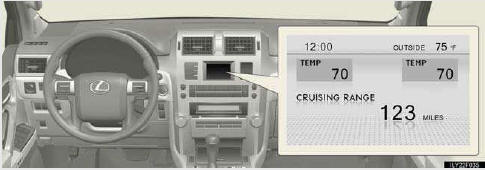
Clock
Indicates the time.
Outside temperature
Indicates the outside temperature.
The temperature range that can be displayed is from -40 °F (-40 °C) to 122 °F (50 °C).
Air conditioning system display
Rear view monitor
Automatically displayed when the shift lever is moved into R.
Multi-terrain Monitor (if equipped)
Wide view front & side monitor (if equipped)
Trip information
Displays driving range, fuel consumption and other cruising-related infor- mation.
Intuitive parking assist display (if equipped)
See also:
Ignition system
NOTICE
- Iridium-tipped spark plugs
Use only iridium-tipped spark plugs. Do not adjust the spark plug gap. ...
Intuitive parking assist
The distance from your vehicle to nearby obstacles when parallel
parking or maneuvering into a garage is measured by the sensors and
communicated via the multi-information display, touch screen and ...
Rear window and outside rear view mirror defoggers
These features are used to defog the rear window, and to remove rain-
drops, dew and frost from the outside rear view mirrors.
On/off
The operation time changes
according to the ambient
tempera ...