
Range covered by each camera
Lexus GX / Lexus GX Owners Manual / When driving / Using other driving systems / Wide view front & side monitor / Range covered by each camera
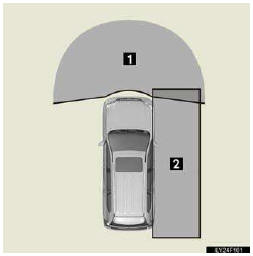
1. Wide view front monitor
2. Side monitor
The illustration shown here is an example. As such, the actual visible area may be different. See P. 294 for information about the visual range of each camera.
See also:
Indicators and warning lights
The indicator and warning lights on the instrument cluster and center
panel inform the driver of the status of the vehicle’s various systems.
For the purpose of explanation, the following illust ...
Brakes
*1: Minimum pedal clearance when depressed with a force of 110 lbf (490 N, 50
kgf) while the engine is running.
*2: Parking brake pedal travel when depressed with a force of 44.1 lbf (196 N,
20 ...