
Disabling pre-collision braking
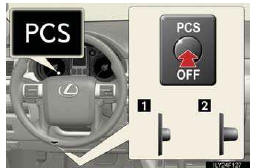
1.Pre-collision braking disabled
2.Pre-collision braking enabled
The “PCS� warning light turns on when pre-collision braking is dis- abled.
See also:
If you have a flat tire
Remove the flat tire and replace it with the spare provided.
- Before jacking up the vehicle
• Stop the vehicle on a hard, flat surface.
• Set the parking brake.
• Shift the shift leve ...
Lubrication system
*: The engine oil capacity is a reference quantity to be used when exchanging.
Warm up and turn off the engine, wait more than 5 minutes, and check the oil
level on the dipstick.
- Engine ...
California Emission Control Warranty
Vehicles equipped with a California Certified Emission Control System that
are registered and operated in California or any state that adopts California emission
warranty provisions are covered by ...