
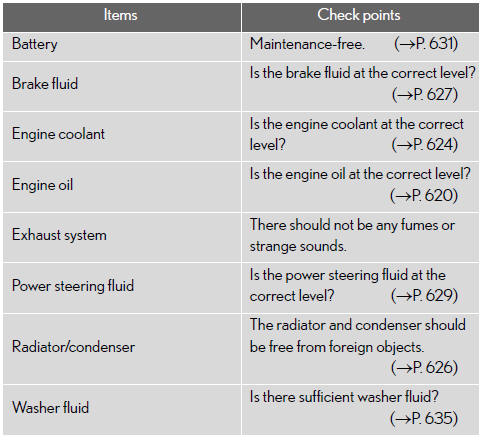
Engine compartment
Lexus GX / Lexus GX Owners Manual / Maintenance and care / Maintenance / General maintenance / Engine compartment
See also:
Introduction
This manual explains the operation of the Navigation System.
Please read this manual carefully to ensure proper use. Keep this manual in your
vehicle at all times.
The Navigation System is one of ...
Opening the fuel tank cap
Perform the following steps to open the fuel tank cap.
Before refueling the vehicle
Turn the “ENGINE START STOP� switch off and ensure that all the doors and windows
are closed.
Opening the f ...
Display
Wide view front monitor
The image from the front camera is displayed. Use this monitor to help check
the area in front of the vehicle for safety, for example in intersec- tions with
poor visibili ...