
Initialization
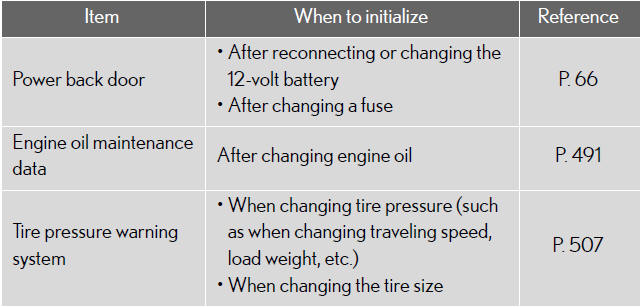
Items to initialize
The following items must be initialized for normal system operation in
cases
such as after the 12-volt battery is reconnected, or maintenance is performed
on the vehicle.
See also:
Limitations of the navigation system
This navigation system calculates the current vehicle position using satellite
signals, various vehicle signals, map data, etc. However, the accurate position
may not be shown depending on the sat ...
Vehicle interior
...
Wide View Front & Side Monitor
This system can display the wide view front monitor and the side monitor
separately or at
the same time. This system helps the driver check for front and side of the
vehicle.
ON/OFF
The displ ...