
Vanity mirrors
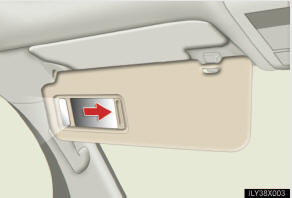
Slide the cover.
The light turns on when the cover is opened.
See also:
Have the vehicle inspected by your Lexus dealer immediately.
A buzzer sounds and a warning message is shown on the multi-informa- tion display.
Failure to investigate the cause of the following warnings may lead to the system
operating abnormally and possib ...
Cool box
Lift the lid while pulling up the lower lever to release the lock.
Turns the cool box on/off
When on, the indicator light comes on.
- The cool box can be operated when
The “ENGINE STAR ...
Travel Protection
Lexus will reimburse for a rental car
for up to five days and for overnight
lodging for up to three nights (not to
exceed $200 per night) if all of the
following occur:
• Your vehicle becomes i ...