
Automatic Transmission
■Shift positions
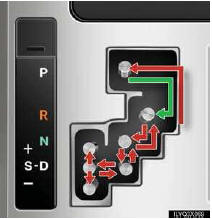
P Park*
R Reverse
N Neutral (drive not engaged)
D Drive
S “S� mode
*: The engine can only be started in “P�.
 The vehicle can only be shifted
out of “P�
when the “ENGINE START STOP� switch is
in IGNITION ON mode and the brake pedal
is depressed.
The vehicle can only be shifted
out of “P�
when the “ENGINE START STOP� switch is
in IGNITION ON mode and the brake pedal
is depressed.
■“Sâ€� mode
“S� mode allows the driver to select the shift range manually based on driving conditions.
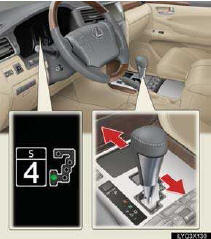
1 Shift the shift lever to “S�.
T2 o upshift: shift the shift lever toward “+�. To downshift: shift the shift lever toward “-�.
The selected shift range is displayed on the instrument cluster.
See also:
Installing tire pressure warning valves and transmitters
When replacing tires or wheels, tire pressure warning valves and trans- mitters
must also be installed.
When new tire pressure warning valves and transmitters are installed, new ID
codes must be ...
Front differential
*: Your Lexus vehicle is filled with “Toyota Genuine Differential Gear Oil� at
the factory.
Use Lexus approved “Toyota Genuine Differential Gear Oil� or an equivalent of
matching qualit ...
Front automatic air conditioning system
Air outlets and fan speed are automatically adjusted according to the temperature
setting.
Vehicles with a navigation syste
Refer to the “Navigation System Owner’s Manual�.
Vehicles without ...