
ECT Switch
Use the mode select switch to select the driving mode that best suits the driving and road conditions.
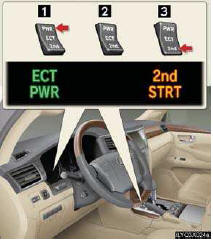
1 Power mode
For more powerful acceleration and uphill
driving.
2 Normal mode
3 “2nd STRT� (second start) mode
For starting or accelerating on snow-covered
roads or other slippery surfaces.
An indicator comes on when in power or second start mode.
See also:
Front passenger occupant classification system
Your vehicle is equipped with a front passenger occupant classifica-
tion system. This system detects the conditions of the front passenger
seat and activates or deactivates the devices for front pa ...
Customizable features
Your vehicle includes a variety of electronic features that can be personalized
to suit your preferences. Programming these preferences requires specialized equipment
and may be performed by your ...
Defogging the windshield
Defogging
The air intake is automatically switched to
(outside air) mode. It is not possible
to recircu- lated air mode when the switch is on.
The air conditioning system oper- ates automaticall ...