
Door Locks
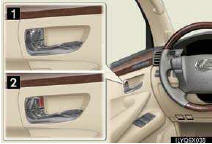
■Locking the vehicle from inside
►Inside lock button
►Door lock switch
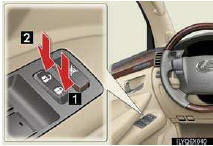
Operates all door locks.
1 Locks
2 Unlocks
■Locking the vehicle from outside
►Using the entry function or wireless remote control
■Rear door child-protector lock
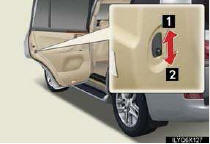
The door cannot be opened from inside the vehicle when the locks are set.
1 Unlock
2 Lock
These locks can be set to prevent children from opening the rear doors. Push down on each rear door switch to lock both rear doors.
See also:
Typical voice guidance prompts
As the vehicle approaches an intersec-
tion, or point, where maneuvering the
vehicle is necessary, the system’s voice
guidance will provide various messages
INFORMATION
● The street n ...
Cruise Control
Cruise control allows the driver to maintain a constant speed without having
to operate the
accelerator pedal.
Use for highway driving or when traveling at a constant speed for long periods
of ...
Off-road vehicle features
• Specific design characteristics give it a higher center of gravity than ordinary
passenger cars. This vehicle design feature causes this type of vehicle to be more
likely to rollover. And, uti ...