
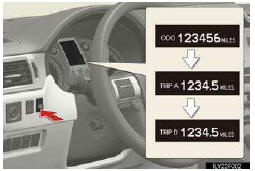
Changing the display
Switches between odometer and trip meter displays. When the trip meter is displayed, pressing and holding the button will reset the trip meter.
See also:
Parking brake
To set the parking brake, fully depress the parking brake pedal with your left
foot while depressing the brake pedal with your right foot.
(Depressing the pedal again releases the parking brake.) ...
Engine coolant
The coolant level is satisfactory if it is between the “F� and “L� lines on the
reservoir when the engine is cold.
1. Reservoir cap
2. Full
3. Low
If the level is on or below the “Lâ ...
Orientation of the map
The orientation of the map can be changed from North−up to Heading−up by touching
the orientation symbol at the top left of the screen.
Touch or
.
North−up screen
Headin ...