
Driving in vehicle-to-vehicle distance control mode
This mode employs a radar sensor to detect the presence of vehicles up to approximately 400 ft. (120 m) ahead, determines the current vehicle- to-vehicle following distance, and operates to maintain a suitable follow- ing distance from the vehicle ahead.
Note that vehicle-to-vehicle distance will close in when traveling on long downhill slopes.
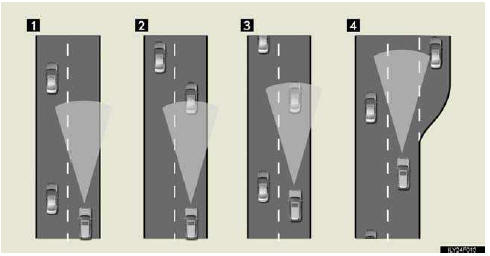
1. Example of constant speed cruising
When there are no vehicles ahead
The vehicle travels at the speed set by the driver. The desired vehicle-to-vehi- cle distance can also be set by operating the vehicle-to-vehicle distance con- trol.
2. Example of deceleration cruising
When the vehicle ahead is driving slower than the set speed
When a vehicle is detected running ahead of you, the system automatically decelerates your vehicle. When a greater reduction in vehicle speed is nec- essary, the system applies the brakes. A warning tone warns you when the system cannot decelerate sufficiently to prevent your vehicle from closing in on the vehicle ahead.
3. Example of follow-up cruising
When following a vehicle driving slower than the set speed
The system continues follow-up cruising while adjusting for changes in the speed of the vehicle ahead in order to maintain the vehicle-to-vehicle dis- tance set by the driver.
4. Example of acceleration
When there are no longer any vehicles ahead driving slower than the set speed
The system accelerates until the set speed is reached. The system then returns to constant speed cruising.
See also:
General information
You are responsible for ensuring that
your Lexus is operated and maintained
according to the instructions
in the Owner’s Manual and the
“Maintenance Information� section
of this guide.
Y ...
Reordering destinations
When more than one destination is set, you can change the arrival order of the
destinations.
1. Touch “Route�.
2. Touch “Reorder�.
3. Touch the desired destination and touch “Move ...
Deleting previous destinations
The previous destination can be deleted.
1. Push the “SETUP� button.
2. Touch “Navi.� on the “Setup� screen.
3. Touch “Delete Previous Dest.�.
4. Touch the button you want to d ...