
Disabling pre-collision braking
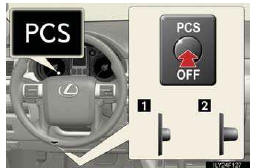
1.Pre-collision braking disabled
2.Pre-collision braking enabled
The “PCS� warning light turns on when pre-collision braking is dis- abled.
See also:
Additional Coverage
After your roadside assistance coverage expires, you may join a motor club created
exclusively for Lexus owners. Benefits include roadside assistance coverage, a trip-planning
service and discount ...
Speed dials setting
“Speed dials setting� is accessed from the “Speed Dials� screen.
1. Push the “SETUP� button.
2. Touch “Phone�.
3. Touch “Phonebook�.
4. Touch “Manage Speed Dials�.
Ple ...
Type A: function achieved by using a cellular phone
Of the functions included with Lexus Enform with Safety Connect, only Apps
can be
achieved by using a cellular phone.
Apps is a service that enables the usable contents of a cellular phone to be ...