
Air conditioning filter
The air conditioning filter must be changed regularly to maintain air conditioning efficiency.
- Removal method
 Turn the “ENGINE START STOP� switch
off.
Turn the “ENGINE START STOP� switch
off.
Open the glove box and remove the glove box cover.
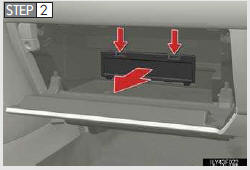
Remove the filter cover.
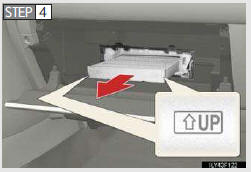
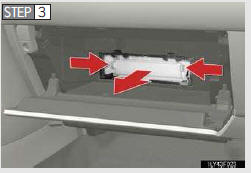
Replace the filter with a new one.
The “↑UPâ€� marks shown on the filter should be pointing up.
- Changing interval
Inspect and replace the air conditioning filter according to the maintenance sched- ule. In dusty areas or areas with heavy traffic flow, early replacement may be required. (For scheduled maintenance information, refer to the “Warranty and Ser- vices Guide/Owner’s Manual Supplement/Scheduled Maintenance�.)
- If air flow from the vents decreases dramatically
The filter may be clogged. Check the filter and replace if necessary.
NOTICE
- When using the air conditioning system
Make sure that a filter is always installed.
Using the air conditioning system without a filter may cause damage to the system.
See also:
XM function-overview
XM SERVICES
XM services are subscription-based
XM Satellite Radio services to provide
convenient features to subscribers.
● With an active XM subscription, the follow-
ing features are avai ...
First Scheduled Maintenance Service
First Scheduled Maintenance
Service: Six Months or
5,000 Miles
This complimentary service is performed
at six months or 5,000 miles,
whichever occurs first. To obtain this
service, contact your ...
Fog Lights
►Type A
1Turns the fog lights off
2Turns the fog lights off
►Type B
1Turns the fog lights off
2Turns the fog lights off ...