
Other messages
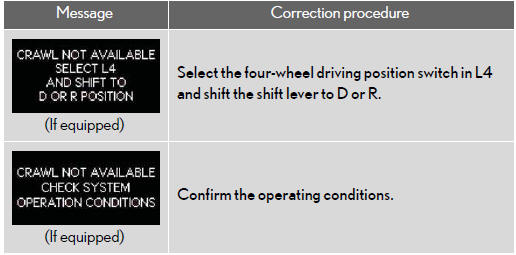
If the following message is displayed, take appropriate action and confirm that the message has disappeared.
- Warning light display in radar cruise mode (if equipped)
In the following cases, the warning light may not be displayed even if vehicle-to- vehicle distance decreases:
• When your vehicle and the vehicle ahead are traveling at the same speed or the vehicle ahead is traveling more quickly than your vehicle
• When the vehicle ahead is traveling at a very low speed
• Immediately after cruise control speed is set
• At the instant the accelerator pedal is depressed
See also:
Set up screen
You can change the touch screen to your desired settings.
Press the “SETUP� button to display the “Setup� screen.
General settings
This screen is used for language selection and the o ...
Do-it-yourself maintenance
Do-it-yourself service precautions
If you perform maintenance by yourself, be sure to follow the correct
procedures
as given in these sections.
CAUTION:
The engine compartment contains many ...
Receive on the Bluetooth phone
When a call is received, this screen is displayed with a sound. Touch
or push
of the steering wheel to talk on the
phone.
To refuse to receive the call:
Touch or push
of the steering whee ...