
List of storage features
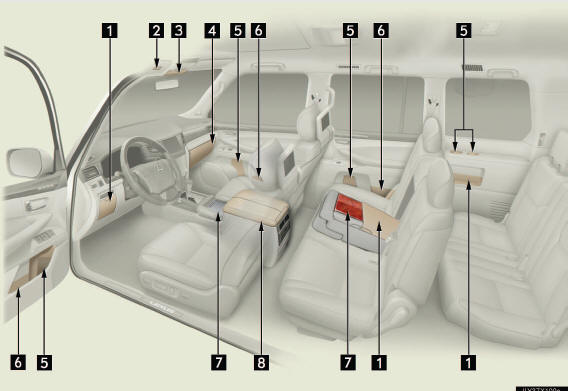
1 Auxiliary boxes
2 Card holder
3 Overhead console
4 Glove box
5 Bottle holders
6 Door pockets
7 Cup holders
8 Console box
Cool box
CAUTION
- Items that should not be left in the storage spaces
Do not leave glasses, lighters or spray cans in the storage spaces, as this may
cause the following when cabin temperature becomes high:
l Glasses may be deformed by heat or cracked if they come into contact
with other stored items.
l Lighters or spray cans may explode. If they come into contact with other
stored items, the lighter may catch fire or the spray can may release gas,
causing a fire hazard.
See also:
Navigation settings
“Home� and “Preset Destinations� can be set and edited.
Points or areas on the map can be registered.
On this screen, the following operations can be performed.
...
Wide view front & side monitor
This system can display the wide view front monitor and the side monitor.
The wide view front monitor uses a super-wide angle lens to display on screen
the areas to the left and right of the vehicl ...
Power windows
The power windows can be opened and closed using the following
switches.
1 Closing
2 One-touch closing*
3 Opening
4 One-touch opening*
*:Pressing the switch in the
opposite direction will sto ...