
Front Air Conditioning System
Press “CLIMATE� button to display the air conditioning operation screen. For details, refer to the Owner’s Manual.
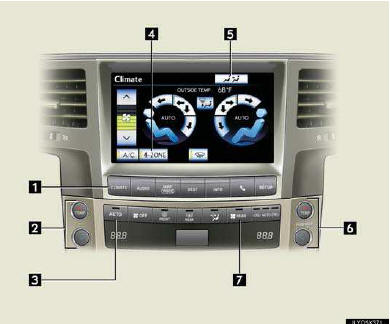
1 Air conditioning operation screen display button
2 Driver’s side temperature control
3 Automatic mode
4 4-zone operation switch
5 Rear air conditioning operation screen display switch
6 Passenger’s side temperature control
7 Rear air conditioning operation mode
■Using the automatic mode
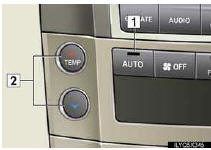
1 Press the “AUTO� button.
2 Press  to increase the
temperature
and
to increase the
temperature
and  to decrease the temperature
■Adjusting the temperature in individual mode
In individual mode, the temperature for the driver’s, front passenger’s and rear seats can be adjusted separately.
1 Touch “4-ZONE� on the operation screen if its indicator is off.
2 Press the passenger’s side temperature control buttons to adjust the temperature for the passenger’s side. To adjust the temperature for the rear seats, see below.
See also:
Using the call history memory
Follow the procedure below to use a number stored in the call history memory:
Press the talk switch and say “Redial�
(when using a number stored in the outgoing call history memory) or “Call ...
Range covered by each camera
1. Front monitor
2. Side-front simultaneous display monitor
3. Side-rear simultaneous display monitor
4. Rear monitor
The illustration shown here is an example. As such, the actual visible area ...
Setting station presets (excluding XM® Satellite Radio)
Search for the desired stations
by turning the “TUNE/SEL� knob or pressing “
� or “ � on the “SEEK•TRACK� button.
Press and hold the button (from
the 1 button to the 6 butto ...