
Door Locks
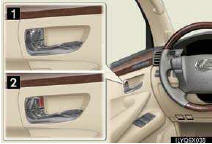
■Locking the vehicle from inside
►Inside lock button
►Door lock switch
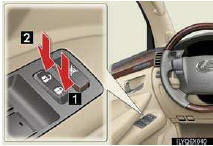
Operates all door locks.
1 Locks
2 Unlocks
■Locking the vehicle from outside
►Using the entry function or wireless remote control
■Rear door child-protector lock
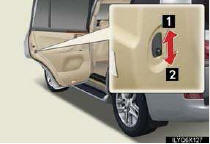
The door cannot be opened from inside the vehicle when the locks are set.
1 Unlock
2 Lock
These locks can be set to prevent children from opening the rear doors. Push down on each rear door switch to lock both rear doors.
See also:
Heated steering wheel
The heated steering wheel heats the leather portion of the steering wheel.
Turns the heater on/off
The indicator light comes on when the heater is operating.
- The heated steering wheel can ...
Sun visors
1. To set the visor in the forward position, flip it down.
2. To set the visor in the side position, flip down, unhook, and swing it to
the side.
3. To use the side extender, place the visor in ...
Stowing the flat/spare tire, jack and tools
Lay down the tire with the outer side facing up, and install the hold- ing bracket.
Insert the holding bracket tab into one of the holes in the wheel.
Raise the tire.
Pull the tire towards the re ...