
If the engine does not start
Make sure that the correct operating procedures have been followed.
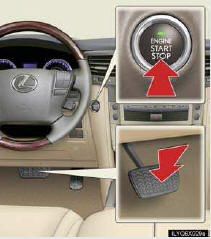

Make sure that the brake pedal is firmly depressed when attempting to start the engine.
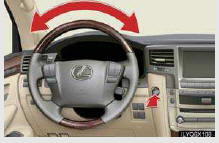

Make sure that the steering lock is released.
To release the steering lock, gently turn the wheel left or right while pressing the “ENGINE START STOP� switch.
If the engine still does not start, see the Owner’s Manual for more information or contact your Lexus dealer.
See also:
Dialing by inputting a name
Press the talk switch and say “Dial
by name�.
Select a registered name to be input
by either of the following methods:
a. Press the talk switch and say a registered name.
b. Press the tal ...
“Destination� screen
The “Destination� screen enables a destination search. Press the “DEST�
button to display
the “Destination� screen.
...
Safety Connect
Safety Connect is a subscription-based telematics service that uses
Global Positioning System (GPS) data and embedded cellular technol-
ogy to provide safety and security features to subscribers. Sa ...