
Electronic Key Alarm
The electronic key alarm uses an alarm and warning messages to indicate that the electronic key has been used improperly. Take appropriate measure in response to any warning messages that are displayed. In some cases, an alarm may sound without an accompanying warning message. If so, follow the correction procedure in the table below.
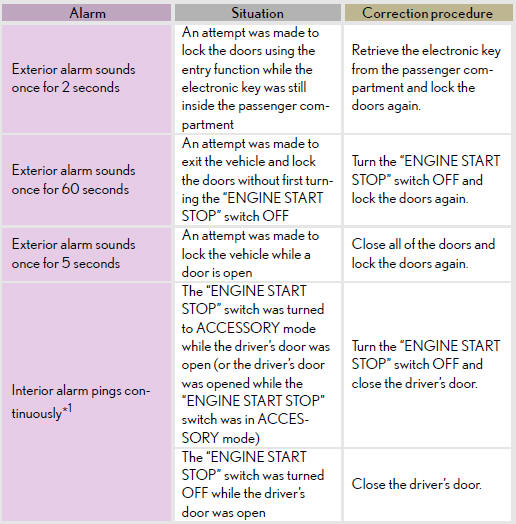
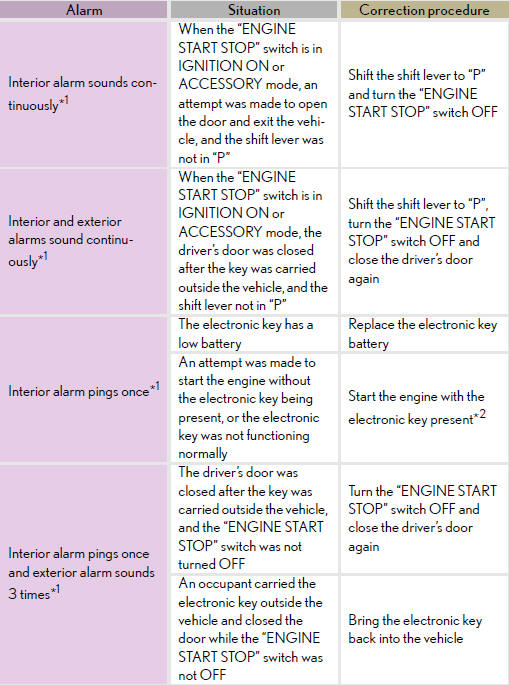
*1: A message will be shown on the multi-information display in the
instrument cluster.
*2: If the engine does not start when the electronic key is inside the vehicle,
the electronic
key battery may be depleted or there may be difficulties receiving signal from
the key.
See also:
Luggage compartment features
- Cargo hooks
Vehicles without third seats
Raise the hook to use.
The cargo hooks are provided for securing loose items.
Vehicles with third seats
Raise the hook to use.
The cargo hooks ...
Switching the display
Press the “TEXT� button.
Each time the button is pressed, the display changes in the following order:
Elapsed time → Album title → Track title → Artist name ...
Antenna location and effective range
Antenna location
1.Antenna outside cabin
2. Antennas inside cabin
3. Antenna outside luggage com- partment
- Effective range (areas within which the electronic key is detected)
- Wh ...