
Expanded voice commands
Touching “On� next to “Expanded Voice Commands� on the “Voice Set- tings� screen enables voice command operation of the audio/video and air conditioning system. (See page 56.) For more information on operations that can be controlled using expanded voice commands, refer to “COMMAND LIST�.
VOICE COMMAND EXAMPLE: TURN THE AUDIO SYSTEM ON
1 Press the talk switch.
2 Say “Audio on�.
INFORMATION
●Commands relating to operation of the audio/video and air conditioning systems can only be performed when the audio and air conditioning systems are turned on.
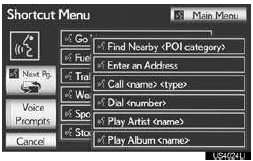
●Expanded voice commands can be rec- ognized when the “Shortcut Menuâ€� screen is displayed
See also:
Listing the registered cellular phones
Select “List Phones� using a voice command or the “TUNE/SEL� knob.
The list of registered cellular phones will be read aloud.
When listing is complete, the system returns to “Phone Setup†...
Seat belts
Make sure that all occupants are wearing their seat belts before driving the
vehicle.
- Correct use of the seat belts
1. Extend the shoulder belt so that it comes fully over the shoulder, ...
Registering preset destinations
1 Press the “DEST� button.
2 Touch one of the preset destination
buttons.
A preset destination can be set to any preset
destination button that has not yet
been set.
3 Touch “Yes�.
...