
Disabling pre-collision braking
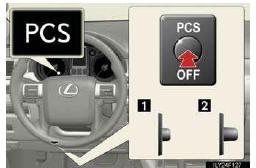
1.Pre-collision braking disabled
2.Pre-collision braking enabled
The “PCS� warning light turns on when pre-collision braking is dis- abled.
See also:
Intuitive parking assist
The distance from your vehicle to nearby obstacles when parallel
parking or maneuvering into a garage is measured by the sensors and
communicated via the multi-information display, touch screen and ...
Making a phone call
- Making a phone call
• Dialing by inputting a number
“Dial by number�
• Dialing by inputting a name
“Dial by name�
• Speed dialing
• Dialing a number stored in the outgoin ...
Using the DVD changer
1. Turning on DVD changer mode
2. Selecting a disc
Selecting a disc
Push “ � or “
� of “DISC·CH� until the desired disc
number appears on the screen.
Audio CD, CD text
MP3/WM ...