
Symbols used in illustrations


The symbol of a circle with a slash through it means “Do not�, “Do not do this�, or “Do not let this happen�.
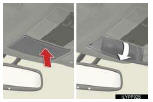

 Indicates the action (pushing, turn-
ing, etc.) used to operate switches and other devices.
Indicates the action (pushing, turn-
ing, etc.) used to operate switches and other devices.
 Indicates the outcome of an opera-
tion (e.g. a lid opens).
Indicates the outcome of an opera-
tion (e.g. a lid opens).
See also:
Fuel pump shut off system
To minimize the risk of fuel leakage when the engine stalls or an airbag
inflates upon collision, the fuel pump shut off system stops supplying
fuel to the engine.
Follow the procedure below to res ...
The distance display and buzzer
When a sensor detects an obstacle, the direction of and the approximate distance
to the obstacle are displayed and the buzzer sounds.
Distance display
Corner sensor
Center sensors
Buzzer ope ...
Customization
Customizable features
Your vehicle includes a variety of electronic features that can be
personalized
to suit your preferences. Programming of these preferences can be
performed by your Lexus dea ...