
Emergency flashers
The emergency flashers are used to warn other drivers when the vehicle has to be stopped in the road due to a breakdown, etc.
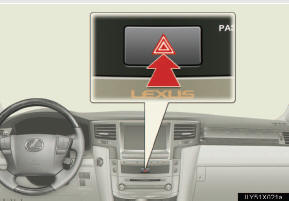
Press the switch.
All the turn signal lights will flash.
To turn them off, press the switch once again.
- Emergency flashers
If the emergency flashers are used for a long time while the engine is not
operating, the battery may discharge.
See also:
Repair delays
If a Lexus dealership is unable to
complete repairs on your vehicle
within 30 days, you may have the
repairs made under Lexus’ provisions
for emergency warranty repairs. ...
Removing a child restraint installed with a seat belt
Push the buckle release button and fully retract the seat belt.
...
Set up screen
You can change the touch screen to your desired settings.
Press the “SETUP� button to display the “Setup� screen.
General settings
This screen is used for language selection and the o ...