
Horn
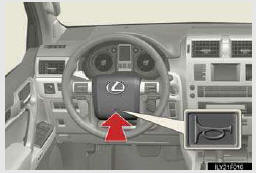
To sound the horn, press on or close to the
 mark.
mark.
See also:
Floor mat
Use only floor mats designed specifically for vehicles of the same model and
model year as your vehicle. Fix them securely in place onto the carpet.
Fix the floor mat in place using the retaining h ...
Engine immobilizer system
The vehicle’s keys have built-in transponder chips that prevent the engine
from starting if a key has not been previously registered in the vehicle’s onboard
computer.
Never leave the keys in ...
Symbols used in illustrations
The symbol of a circle with a slash through it means “Do not�, “Do not do this�,
or “Do not let this happen�.
Indicates the action (pushing, turn-
ing, etc.) used to operate swi ...