
If a warning message is displayed
If a warning is shown on the instrument cluster, stay calm and perform the following actions:
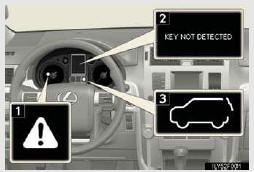
1. Master warning light
The master warning light also comes on or flashes in order to indicate that a message is cur- rently being displayed on the instrument cluster.
2. Multi-information display
3. Rear height control air sus- pension display
If any of the warning lights comes on again after the following actions have been performed, contact your Lexus dealer.
- Stop the vehicle immediately.
- Have the vehicle inspected by your Lexus dealer immediately.
- Follow the correction procedures.
- Have the malfunction repaired immediately.
- Other messages
See also:
Hands-free System (For Cellular Phone)
■Bluetooth® phone pairing
Compatible Bluetooth®-equipped phones can be connected to the vehicle,
enabling
hands-free operation. Please refer to the cellular phone manufacturer’s user
g ...
Headlight aim (vehicles with low beam halogen bulbs)
- Vertical movement adjustment bolts
1. Adjustment bolt A
2. Adjustment bolt B
- Before checking the headlight aim
Make sure the vehicle has a full
tank of gas and the area around ...
Rear view monitor system
The rear view monitor assists the driver by displaying an image of the area
behind the vehicle while reversing. The image is displayed in reverse on the screen.
This reversed image is a similar im ...