
Other messages
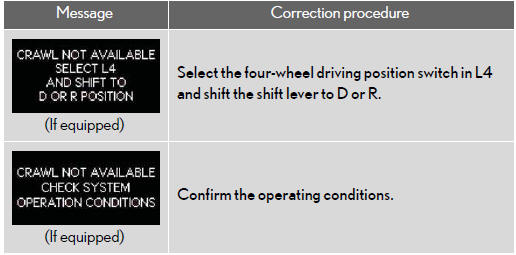
If the following message is displayed, take appropriate action and confirm that the message has disappeared.
- Warning light display in radar cruise mode (if equipped)
In the following cases, the warning light may not be displayed even if vehicle-to- vehicle distance decreases:
• When your vehicle and the vehicle ahead are traveling at the same speed or the vehicle ahead is traveling more quickly than your vehicle
• When the vehicle ahead is traveling at a very low speed
• Immediately after cruise control speed is set
• At the instant the accelerator pedal is depressed
See also:
If a warning light turns on or a warning buzzer sounds...
Calmly perform the following actions if any of the warning lights turn on
or flash. If a light turns on or flashes, but then turns off, this does not necessarily
indicate a malfunction in the syst ...
Light bulbs
You may replace the following bulbs by yourself. The difficulty level of replacement
varies depending on the bulb. If necessary bulb replacement seems difficult to perform,
contact your Lexus deal ...
Positions for towing hitch receiver and hitch ball
1. Weight carrying ball position:
50.5 in. (1282.9 mm)
2. Hitch receiver pin hole position:
44.1 in. (1120.4 mm) ...