
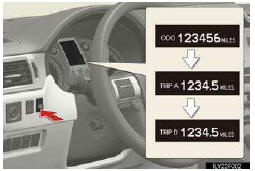
Changing the display
Switches between odometer and trip meter displays. When the trip meter is displayed, pressing and holding the button will reset the trip meter.
See also:
General Warranty Provisions
Who Is the Warrantor
The warrantor for these limited warranties is Lexus, a division of Toyota Motor
Sales, U.S.A., Inc., 19001 South Western Avenue, Torrance, California 90509-2991,
a California ...
eDestination
With the eDestination feature, you can go online, via the Lexus.com owner’s Web
site, to select and organize destinations of your choice and then wirelessly send
them to your vehicle’s navigat ...
Lexus Dealership Service
To ensure that your vehicle receives first-quality service and factoryauthorized
parts, Lexus recommends having maintenance performed by an authorized Lexus dealership.
To locate your nearest auth ...