
Headlight switch
The headlights can be operated manually or automatically.
Turning the end of the lever turns on the lights as follows:
Type A
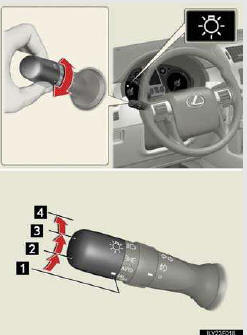
1.  The daytime running lights turn
off.
The daytime running lights turn
off.
2.  The headlights, park- ing lights
and so on turn on and off auto- matically (when the “ENGINE START STOP� switch is
in IGNITION ON mode).
The headlights, park- ing lights
and so on turn on and off auto- matically (when the “ENGINE START STOP� switch is
in IGNITION ON mode).
3.  The side marker, parking, tail,
license plate and instrument panel lights turn on.
The side marker, parking, tail,
license plate and instrument panel lights turn on.
4.  The headlights and all the lights
listed above turn on.
The headlights and all the lights
listed above turn on.
Type B
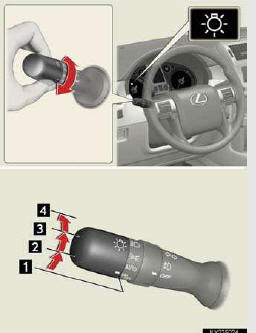
1. The daytime running lights turn
off.
2. The headlights, park- ing lights
and so on turn on and off auto- matically (when the “ENGINE START STOP� switch is
in IGNITION ON mode).
3. The side marker, parking,
tail, license plate and instrument panel lights turn on.
4. The headlights and all the lights
listed above turn on.
Type C

1.  The daytime running lights turn
on.
The daytime running lights turn
on.
2.  The side marker, parking, tail,
license plate and instrument panel lights turn on.
The side marker, parking, tail,
license plate and instrument panel lights turn on.
3.  The headlights and all lights
listed above turn on.
The headlights and all lights
listed above turn on.
4.  The headlights, park- ing lights
and so on turn on and off auto- matically (when the “ENGINE START STOP� switch is
in IGNITION ON mode).
The headlights, park- ing lights
and so on turn on and off auto- matically (when the “ENGINE START STOP� switch is
in IGNITION ON mode).
See also:
Menu list of the Bluetooth® audio system
- Normal operation
- When using a voice command
For numbers, say a combination of single digits from zero to nine.
Say the command correctly and clearly
- Situations that the s ...
Open source license
This product uses the following open
source software.
· T-Kernel
This Product uses the Source Code of
T-Kernel under T-License granted by
the T-Engine Forum
(www.t-engine.org).
· C Library
...
Power Windows
1 Window lock switch
The window lock switch disables the operation
of all windows other than the driver’s
door window.
2 Power window switches
To open: press the switch.
To close: pull the ...