
Selecting vehicle height
Operating the switch changes vehicle rear height as follows:
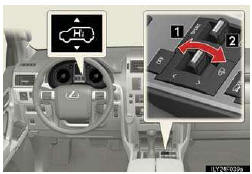
1. Higher
2. Lower
Vehicle height can be adjusted only when the engine is running.
The selected height mode will be shown on the rear height control air suspension display.
The selected mode will flash while the height mode is being changed.
Height modes
• N mode (normal mode): For ordinary driving
Normal height
• HI mode (high mode): For driving on bumpy roads
1.6 in. (40 mm) higher than the normal rear height
HI mode cannot be selected when vehicle speed exceeds 18 mph
(30 km/h).
• LO mode (low mode): For the ease of egress/ingress and loading
luggage
0.8 in. (20 mm) lower than the normal rear height
LO mode cannot be selected when vehicle speed exceeds 7 mph (12 km/h).
See also:
Child restraint systems with a top tether strap
Secure the child restraint using
a seat belt or the LATCH anchors, and do the following.
Move the head restraint in place at the upmost position.
Open the anchor bracket cover, latch the hook o ...
Call on the Bluetooth phone
After you enter the Bluetooth phone, you can call by using hands−free system.
You can call using the 6 methods described below.
By dial
You can call by inputting the phone number.
This canno ...
eDestination
With the eDestination feature, you can go online, via the Lexus.com owner’s Web
site, to select and organize destinations of your choice and then wirelessly send
them to your vehicle’s navigat ...