
Front automatic air conditioning system
Air outlets and fan speed are automatically adjusted according to the temperature setting.
Vehicles with a navigation syste
Refer to the “Navigation System Owner’s Manual�.
Vehicles without a navigation system
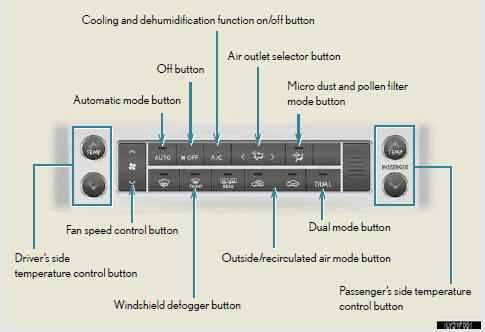
Control panel (vehicles without a rear automatic air conditioning system)
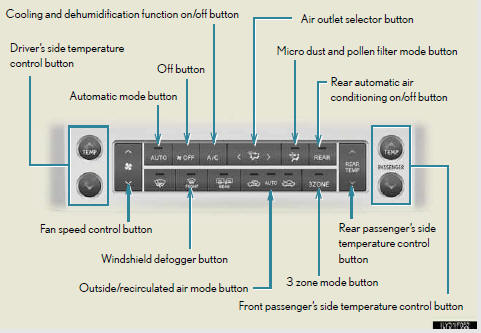
Control panel (vehicles with a rear automatic air conditioning system)
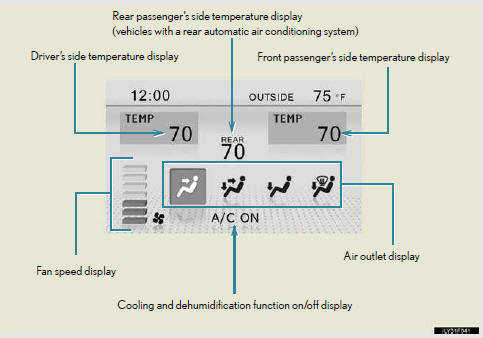
Multi-information display (Accessory meters)
- Using the automatic air conditioning system
- Adjusting the settings manually
- Changing the rear seat settings (vehicles with a rear automatic air conditioning system)
- Defogging the windshield
- Micro dust and pollen filter mode button
- Adjusting the sensitivity of the air intake control in automatic mode (vehicles with a rear automatic air conditioning system)
- Adjusting the position of and opening and closing the air outlets
See also:
Cup holders
For front seats
Press down and release the cup holder lid.
You can remove the holder inside.
For second seats (vehicles without third seats)
Pull the armrest down.
For second seats (vehicles ...
Switching the display
1. Menu switch
Changes modes to electronic fea- tures control mode, customization mode or back
to normal display mode.
2. “ENTER� switch
Changes trip information items.
This switch is also ...
What is not covered
These warranty obligations do not
apply to failures or noncompliance
caused by:
• The use of replacement parts
not certified in accordance with
aftermarket parts certification
regulation ...