
Personal/interior light main switch
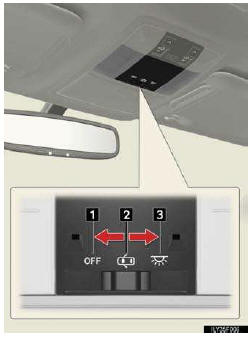
1. OFF
The personal/Interior lights and interior light can be individually turned on or off.
2. Door position
The personal/interior lights come on when a door is opened. They turn off when the doors are closed.
3. On
The personal/interior lights cannot be individually turned off.
See also:
Parts list: long-term emission defect warranty
The parts listed here are covered for
seven years or 70,000 miles from the
vehicle’s in-service date, whichever
occurs first.
Air Conditioning System
• A/C amplifier
• Blower motor with ...
Do-it-yourself service precautions
If you perform maintenance yourself, be sure to follow the correct pro-
cedures given in these sections.
CAUTION
The engine compartment contains many mechanisms and fluids that may
move sudden ...
Windshield wipers and washer
When “AUTO� is selected, the wipers will operate automatically when the sensor
detects falling rain. The system automatically adjusts wiper timing according to
rain volume and vehicle speed.
...