
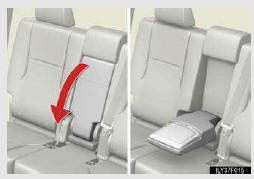
Armrest
Fold down the armrest for use.
NOTICE
- To prevent damage to the armrest
Do not apply too much load on the armrest.
See also:
Installation of a mobile two-way radio system
The installation of a mobile two-way radio system in your vehicle could affect
electronic systems such as:
• Multiport fuel injection system/sequential multiport fuel injection system
•& ...
Using the audio system
Audio system
- Vehicles with a navigation system.
Owners of models equipped with a navigation system should refer to
the “Navigation System Owner’s Manual�.
- Vehicles without a navigation s ...
Voice command system operation
VOICE COMMAND SYSTEM
The voice command system enables the
navigation, audio/video, hands-free and
air conditioning systems to be operated
using voice commands.
The operating procedures of voice ...