
Locking and unlocking the doors and key linked functions
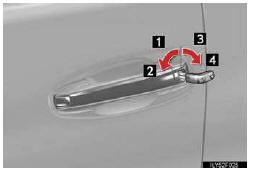
Use the mechanical key in order to perform the following operations (driver’s door only):
1. Locks all the doors
2. Closes the windows and moon roof (turn and hold)*
3. Unlocks the door
Turning the key rearward unlocks the driver’s door. Turning the key once again unlocks the other doors.
4. Opens the windows and moon roof (turn and hold)*
*: This setting must be customized at your Lexus dealer.
See also:
Rear Air Conditioning System
1 Left side temperature control
2 Automatic mode
3 Right side temperature control
1 To use the automatic mode, press the “AUTO�
button.
2 Press “∧â€� on the “TEMPâ€� button to i ...
Dynamic radar cruise control
Dynamic radar cruise control supplements conventional cruise control with
a vehicle-to-vehicle distance control. In vehicle-to-vehicle distance control mode,
the vehicle automatically accelerates ...
Seat belts
Make sure that all occupants are wearing their seat belts before driving the
vehicle.
- Correct use of the seat belts
1. Extend the shoulder belt so that it comes fully over the shoulder, ...