
Dimensions and weight
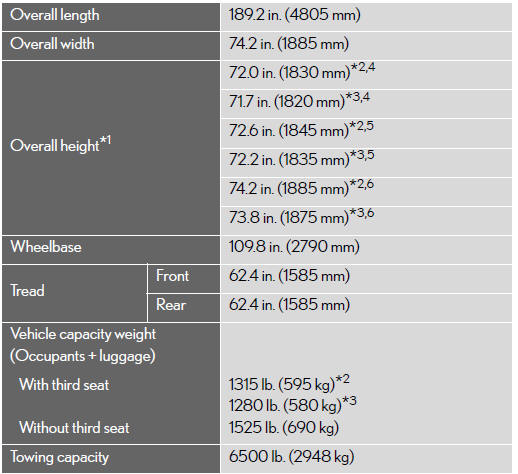
*1: Unladen vehicle
*2: Vehicles without rear height control air suspension
*3: Vehicles with rear height control air suspension
*4: Vehicles without an antenna and roof rails
*5: Vehicles without an antenna and with roof rails
*6: Vehicles with an antenna
See also:
Selecting conventional constant speed control mode
Constant speed control mode differs from vehicle-to-vehicle distance control
mode. When constant speed control mode is selected, your vehi- cle will maintain
a set speed regardless of whether or n ...
Adding destinations
You can add destinations and search again for the routes.
1. Touch “Route�.
2. Touch “Add�.
3. Input an additional destination in the same way as the destination search.
4. Touch the ...
Deleting a registered portable player
Select “Delete Audio Player (Delete
Audio)� using a voice com- mand or the “TUNE/SEL� knob.
Pattern A
Select the portable player to be
deleted by either of the following methods and se ...