
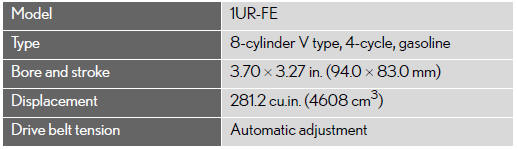
Engine
See also:
Lexus Insider
Lexus Insider is an optional service that
can send audio messages, or articles, to
participating owners’ vehicles via the
navigation system. Potential Lexus Insider
subjects might include, for e ...
Selecting the search area
Change the selected region in order to set a destination from a different region
by using “Address�, “Point of Interest� or “Intersection & Freeway�.
1. Touch “Search Area� to ...
Front passenger occupant classification system
Your vehicle is equipped with a front passenger occupant classification system.
This system detects the conditions of the front passenger seat and activates
or deactivates the devices for the front ...