
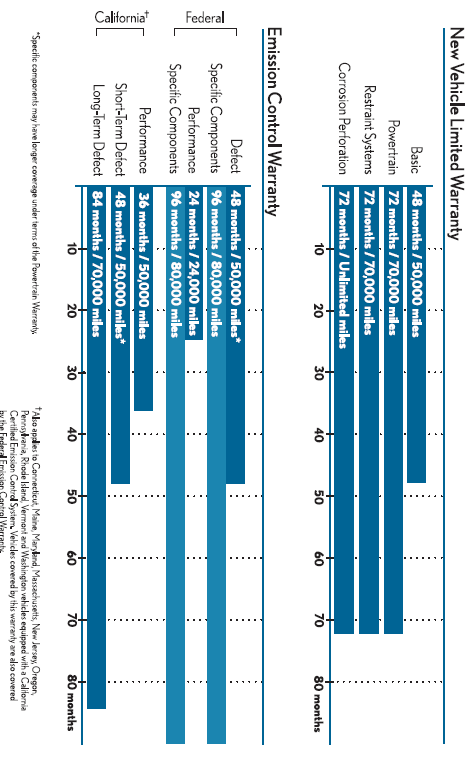
Warranty Coverages at a Glance
Lexus GX / Lexus GX Owners Manual / Warranty information / Introduction / Warranty Coverages at a Glance
See also:
Key information
Keys
Using the mechanical key
To take out the mechanical key, slide the release lever and take the key out.
After using the mechanical key, store it in the electronic key. Carry the mechanical
...
Destination Assist
Destination Assist provides you with live
assistance for finding destinations via the
Lexus Enform with Safety Connect response
center. You can request either a
specific business, address, or ask ...
Using the interior lights
Interior lights list
1. Front personal lights.
2. Front interior lights.
3. Shift lever light (when the “POWER� switch is in ACCESSORY or
ON mode).
4. Rear personal lights.
5. Rear interio ...