
Correct driving posture
Drive with a good posture as follows:
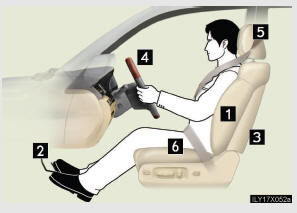
1 Sit upright and well back
in the seat.
2 Adjust the position of the
seat forward or backward
to ensure the pedals can be
reached and easily
depressed to the extent
required.
3 Adjust the seatback so that
the controls are easily
operable.
4 Adjust the tilt and tele-
scopic positions of the
steering wheel downward
so the airbag is facing your
chest.
5 Lock the head restraint in
place with the center of the
head restraint closest to the
top of your ears.
6 Wear the seat belt cor-
CAUTION
- While driving
l Do not adjust the position of the driver’s seat while driving.
Doing so could cause the driver to lose control of the vehicle.
l Do not place a cushion between the driver or passenger and the seatback.
A cushion may prevent correct posture from being achieved, and reduce
the effectiveness of the seat belt and head restraint, increasing the risk of
death or serious injury to the driver or passenger.
l Do not place anything under the front seats.
Objects placed under the front seats may become jammed in the seat
tracks and stop the seat from locking in place. This may lead to an acci-
dent. The adjustment mechanism may also be damaged.
l Do not recline the seat more than necessary when the vehicle is in motion,
to reduce the risk of sliding under the lap belt.
If the seat is too reclined during an accident, the lap belt may slide past the
hips and apply restraint forces directly to the abdomen or your neck may
contact the shoulder belt, increasing the risk of death or serious injury.
- Adjusting the seat position
l Take care when adjusting the seat position to ensure that other passengers
are not injured by the moving seat.
l Do not put your hands under the seat or near the moving parts to avoid
injury.
Fingers or hands may become jammed in the seat mechanism.
See also:
Engine coolant
The coolant level is satisfactory if it is between the “F� and “L� lines on the
reservoir when the engine is cold.
1. Reservoir cap
2. Full
3. Low
If the level is on or below the “Lâ ...
Headlight switch
The headlights can be operated manually or automatically.
Turning the end of the lever turns on the lights as follows:
Type A
1. The daytime running lights turn
off.
2. The headlights, park- ...
Selecting a play mode
Press the “TUNE/SEL� knob to select
iPod menu mode.
Turning the “TUNE/SEL� knob changes
the play mode in the fol- lowing order:
“PLAYLISTSâ€� → “ARTISTSâ€� → “ALBUMSâ ...