
Active head restraints
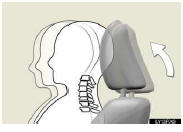
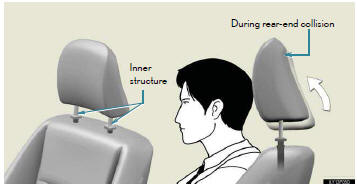
When the occupant’s lower back presses against the seatback dur- ing a rear-end collision, the head restraint moves slightly forward and upward to help reduce the risk of whiplash on the seat occupant.
The auto away function for exiting the driver seat
If the seat is already close to the rearmost position, the auto away function may not operate when the driver exits the vehicle.
Active head restraints
Even small forces applied to the seatback may cause the head restraint to move.
Pushing up a locked head restraint forcibly may appear the head restraint inner structure. These do not indicate problems.
Customization
The distance that the driver’s seat moves backward during the auto away function can be changed.
CAUTION
Seat adjustment
To reduce the risk of sliding under the lap belt during a collision, do not recline the seat more than necessary.
If the seat is too reclined, the lap belt may slide past the hips and apply restraint forces directly to the abdomen, or your neck may contact the shoulder belt, increasing the risk of death or serious injury in the event of an accident.
Adjustments should not be made while driving as the seat may unexpectedly move and cause the driver to lose control of the vehicle.
See also:
Initialization
Items to initialize
The following items must be initialized for normal system operation in cases
such as after the battery is reconnected, or maintenance is performed on the vehicle.
...
Information display
MAP DATABASE VERSION AND COVERAGE AREA
Coverage areas and legal information
can be displayed and map data can be
updated.
1 Press the “INFO� button.
2 Touch “Map Data�.
●The †...
Is the Dispute Settlement Program subject to change?
The information in this booklet about the program is correct as of the date of
printing. However, the program may be changed without notice.
Contact the Lexus Customer Satisfaction Department at (8 ...