
Front seats
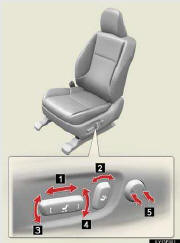
1. Seat position adjustment switch
2. Seatback angle adjustment switch
3. Seat cushion (front) angle adjustment switch
4. Vertical height adjustment switch
5. Lumber support adjustment switch
See also:
Switching the display
Press the “TEXT� button.
Each time the button is pressed, the display changes in the following order:
Elapsed time → Album title → Track title → Artist name ...
What to do if...
f you have a flat tire
Engine immobilizer system
If the engine will not start
If the vehicle battery is discharged
If the shift lever cannot be shifted from “P�
If your vehicle ov ...
Armrest
►Front
Lift the lid while pulling up
the upper lever to release the
lock.
►Rear
Collapse the armrest while
pulling the strap. ...