
Power easy access system
When the driver enters and exits the vehicle, the driver’s seat and steer- ing wheel will automatically perform the following operations:
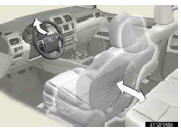
Exiting the vehicle: When all of the following actions have been per- formed, the steering wheel will move up and back to the point far- thest away from the driver and the seat will move backward (auto away function):
• The shift lever has been shifted to P
• The “ENGINE START STOP� switch has been turned off
• The driver seat belt has been unfastened
Entering the vehicle: When either of the following actions has been performed, the steering wheel will move toward the driver and seat will move forward (auto return function):
• The “ENGINE START STOP� switch has been turned to ACCES- SORY mode
• The driver seat belt has been fas- tened
See also:
Operating the system using voice commands
By following voice guidance instructions output from the speaker, voice commands
enable to the operation of the hands-free phone system with- out the need to check
the display or operate the “TU ...
Your warranty rights and obligations
The California Air Resources Board
(CARB) and Lexus are pleased to
explain the emission control system
warranty for your 2013 vehicle. In
California, new motor vehicles must
be designed, built an ...
Changing the passkey
Select “Set Passkey� using a voice
command or the “TUNE/SEL� knob.
Pattern A
Press the talk switch, say a 4 to
8-digit number, and select “Con- firmâ€� using a voice command or the â ...