
List of storage features
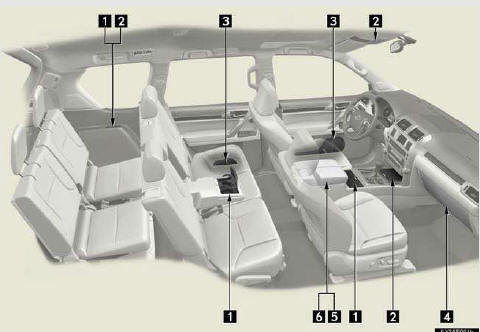
1. Cup holders 2. Auxiliary boxes
3. Bottle holders/door pockets
4. Glove box
5. Console box (if equipped)
6. Coin holder (if equipped)
CAUTION
- Items that should not be left in the storage spaces
Do not leave glasses, lighters or spray cans in the storage spaces, as this may cause the following when cabin temperature becomes high:
• Glasses may be deformed by heat or cracked if they come into contact with other stored items.
• Lighters or spray cans may explode. If they come into contact with other stored items, the lighter may catch fire or the spray can may release gas, causing a fire hazard.
See also:
Inputting letters and numbers/list screen operation
When searching for an address or
name, or entering data, letters and num-
bers can be input via the screen.
• Keyboard layout can be changed.
TO INPUT LETTERS AND
NUMBERS
1 Touch “A-Z� to ...
Folding down the second seatbacks (without third seats)
Before folding down the second seatbacks
Stow the center seat belt buckle with the hook-and-loop fastener and lower the
head restraints to the lowest position.
Folding down second seatbacks
Pul ...
Wheels
If a wheel is bent, cracked or heavily corroded, it should be replaced.
Otherwise, the tire may separate from the wheel or cause loss of handling control.
- Wheel selection
When replacing whe ...