
Overhead console
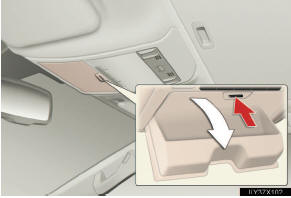
Press the button.
The overhead console is useful for temporarily storing small items.
CAUTION
- While driving
Do not leave the overhead console open.
Items may fall out and cause injury.
See also:
Noise from under vehicle after turning off the engine
Approximately five hours after the engine is turned off, you may hear sound coming
from under the vehicle for several minutes. This is the sound of a fuel evaporation
leakage check and, it does no ...
Loaner Vehicle
If your vehicle must be kept overnight
at a Lexus dealership for a warrantycovered
condition that requires more
than eight hours to repair, Lexus will
provide you with a complimentary
loaner vehi ...
Parking brake
To set the parking brake, fully depress the parking brake pedal with your left
foot while depressing the brake pedal with your right foot.
(Depressing the pedal again releases the parking brake.) ...