
Floor mats
Use only floor mats designed specifically for vehicles of the same model and model year as your vehicle. Fix them securely in place onto the carpet.
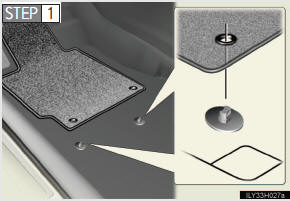
Insert the retaining hooks (clips) into the floor mat eye- lets.
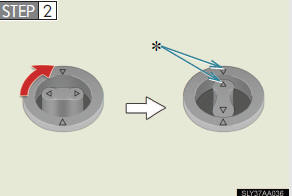
Turn the upper knob of each retaining hook (clip) to secure the floor mats in place.
*:Always align the  marks.
The shape of the retaining hooks (clips) may differ from that shown in
CAUTION
Observe the following precautions.
Failure to do so may cause the driver’s floor mat to slip, possibly interfering with the pedals while driving. An unexpectedly high speed may result or it may become difficult to stop the vehicle, leading to a serious accident.
- When installing the driver’s floor mat
l Do not use floor mats designed for other models or different model year
vehicles, even if they are Lexus Genuine floor mats.
l Only use floor mats designed for the driver’s seat.
l Always install the floor mat securely using the retaining hooks (clips) pro-
vided.
l Do not use two or more floor mats on top of each other.
l Do not place the floor mat bottom-side up or upside-down.
- Before driving
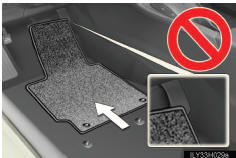
l Check that the floor mat is securely
fixed in the correct place with all the
provided retaining hooks (clips). Be
especially careful to perform this check
after cleaning the floor.
l With the engine stopped and the shift
lever in “P�, fully depress each pedal to
the floor to make sure it does not inter-
fere with the floor mat.
See also:
If the engine will not start
If the engine will not start even though correct starting procedures are being
followed , consider each of the following points:
One of the following may be the cause of the problem:
• There may ...
Volume setting
You can adjust the voice and ring volume.
1. Touch “Volume�.
2. Change each setting according to the following procedures.
3. When you complete all settings, touch “Save�.
Automatic vo ...
eDestination
With the eDestination feature, you can go online, via the Lexus.com owner’s Web
site, to select and organize destinations of your choice and then wirelessly send
them to your vehicle’s navigat ...