
Air conditioning filter
The air conditioning filter must be cleaned or changed regularly to maintain air conditioning efficiency.
- Removal method
 Turn the “ENGINE START STOP�
switch IGNITION
ON mode and switch to recirculated air mode, then turn
the “ENGINE START STOP� switch OFF.
Turn the “ENGINE START STOP�
switch IGNITION
ON mode and switch to recirculated air mode, then turn
the “ENGINE START STOP� switch OFF.
 Open the glove box and remove the
separate tray.
Open the glove box and remove the
separate tray.
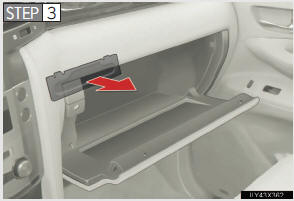
Remove the filter cover.
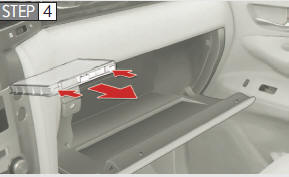
Remove the filter case.
- Cleaning method
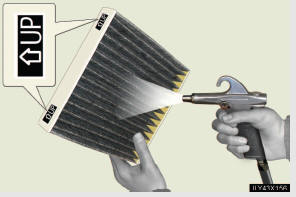
If the filter is dirty, clean by blowing compressed air through the filter from the downward side.
Hold the air gun 2 in. (5 cm) from the filter and blow for approximately 2 minutes at 72 psi (500 kPa, 5.0 kgf/cm2 or bar).
If it is not available, have the filter cleaned by your Lexus dealer.
- Replacement method
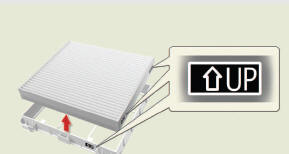
Remove the air conditioning filter and replace it with a new one.
The “↑UPâ€� marks shown on the filter should be pointing up.
- Checking interval
Inspect, clean and replace the air conditioning filter according to the mainte-
nance schedule. In dusty areas or areas with heavy traffic flow, more fre-
quent cleaning or early replacement may be required. (For scheduled
maintenance information, refer to the “Warranty and Services Guide�,
“Owner’s Manual Supplement� or “Scheduled Maintenance�.)
- If air flow from the vents decreases dramatically
The filter may be clogged. Check the filter and replace if necessary.
NOTICE
- To prevent damage to the system
l When using the air conditioning system, make sure that a filter is always
installed.
l When cleaning the filter, do not clean the filter with water.
See also:
Current position display
When starting the navigation system, the current position is displayed first.
This screen displays the current vehicle position and a map of the surrounding
local area.
The current vehicle posit ...
Personal/interior light main switch
1. OFF
The personal/Interior lights and interior light can be individually turned on
or off.
2. Door position
The personal/interior lights come on when a door is opened. They turn off when
th ...
Cargo and luggage
Take notice of the following information about storage precautions, cargo
capacity and load:
• Stow cargo and luggage in the luggage compartment whenever possible.
• Be sure all items are secu ...