
Wide View Front & Side Monitor
This system can display the wide view front monitor and the side monitor separately or at the same time. This system helps the driver check for front and side of the vehicle.
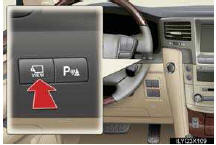
ON/OFF
The display can be changed by pressing the
“VIEW� switch.
For details, see the “Owner’s Manual�.
See also:
Electronic key battery
Replace the battery with a new one if it is depleted.
- You will need the following items:
• Flathead screwdriver
• Small Phillips-head screwdriver
• Lithium battery (CR1632)
- ...
Switching the display
Press the “TEXT� button.
Each time the button is pressed, the display changes in the following order:
Elapsed time → Folder name → File name → Album title (MP3 only) → Tr ...
Explanation of maintenance items
The following descriptions are provided
to give you a better understanding
of the maintenance services that
should be performed on your vehicle.
The scheduled maintenance log indicates
at which ...