
Headlights
►Type A
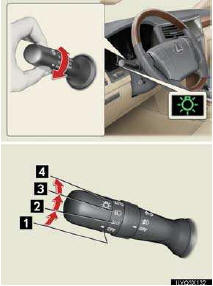
1 The daytime running lights turn
off.
The daytime running lights turn
off.
2 The side marker, parking, tail,
license
plate, daytime running lights and
instrument panel lights turn on.
The side marker, parking, tail,
license
plate, daytime running lights and
instrument panel lights turn on.
3 The headlights and all lights
listed
above (except daytime running
lights) turn on.
The headlights and all lights
listed
above (except daytime running
lights) turn on.
4 The headlights, daytime running
lights and all lights listed above turn
on and off automatically. (When the
“ENGINE START STOP� switch is in
IGNITION ON mode.)
The headlights, daytime running
lights and all lights listed above turn
on and off automatically. (When the
“ENGINE START STOP� switch is in
IGNITION ON mode.)
►Type B

1 The daytime running lights turn
on.
The daytime running lights turn
on.
2 The side marker, parking, tail,
license
plate, daytime running lights and
instrument panel lights turn on.
The side marker, parking, tail,
license
plate, daytime running lights and
instrument panel lights turn on.
3 The headlights and all lights
listed
above (except daytime running
lights) turn on.
The headlights and all lights
listed
above (except daytime running
lights) turn on.
4 The headlights, daytime running
lights and all lights listed above turn
on and off automatically. (When the
“ENGINE START STOP� switch is in
IGNITION ON mode.)
The headlights, daytime running
lights and all lights listed above turn
on and off automatically. (When the
“ENGINE START STOP� switch is in
IGNITION ON mode.)
■Turning on the high beam headlights
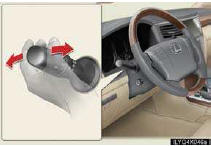
To engage the high beams, push the lever forward.
To flash the high beams, pull the lever and hold.
Vehicles with an Automatic High Beam system: When the light switch is in “AUTO� position, the Automatic High Beam system will be activated.
■AFS (Adaptive Front-lighting System)
AFS improves visibility at intersections and on curves by automatically adjusting the direction of the light axis of the headlights according to vehicle speed and the degree of the tire angle that are controlled by steering input.
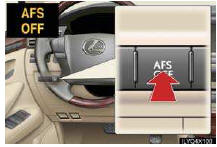
The system can be turned on and off using the “AFS OFF� switch.
See also:
Rear window and outside rear view mirror defoggers
These features are used to defog the rear window, and to remove rain-
drops, dew and frost from the outside rear view mirrors.
On/off
The operation time changes
according to the ambient
tempera ...
Checking and replacing fuses
If any of the electrical components do not operate, a fuse may have
blown. If this happens, check and replace the fuses as necessary.
Turn the “ENGINE START STOP�
switch OFF.
The fuses are lo ...
Opening, closing and locking the doors
Smart access system with push-button start
The following operations can be performed simply by carrying the
electronic
key (including the card key) on your person, for example in your
pocket.
(T ...