
Moon Roof
■Opening and closing
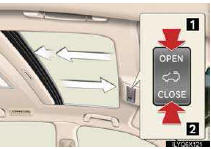
1 Open
Stops just before it is opened fully. Press the
switch again to fully open.
2 Close
To stop partway, press the switch lightly.
■Tilt up and down
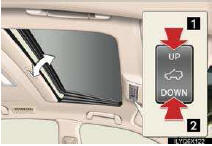
1 Tilt up
2 Tilt down
To stop partway, press the switch lightly.
See also:
Cooling system
...
Typical voice guidance prompts
The voice guidance provides various messages as you approach an intersection,
or other point where you need to maneuver the vehicle.
1. “Proceed about 5 miles to Main
street.�
2. “In h ...
Overview button and guidance screen
*: Press and hold the “PWR·VOL� knob for 3 seconds or more to turn off the
screen and restart the
navigation system. Do this when the vehicle-mounted device response is extremely
slow. ...