
Fuel Tank Cap
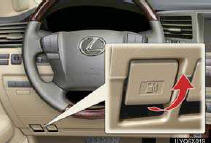
1 Pull the fuel filler door opener
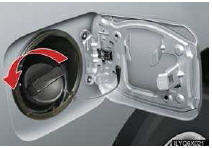
2 Slowly remove the cap by turning it counterclockwise.
See also:
Installing child restraints
Follow the child restraint system manufacturer’s instructions. Firmly secure
child restraints to the seats using the LATCH anchors or a seat belt.
Attach the top tether strap when installing a ch ...
List of Warning/Indicator Lights
*1: If equipped
*2: Turns on due to natural causes such as natural air leaks or tire inflation
pressure changes
caused by temperature including the spare tire. Adjust the tire inflation
pr ...
Orientation of the map
The orientation of the map can be changed from North−up to Heading−up by touching
the orientation symbol at the top left of the screen.
Touch or
.
North−up screen
Headin ...