
Installing child restraints
Follow the child restraint system manufacturer’s instructions. Firmly secure child restraints to the seats using the LATCH anchors or a seat belt.
Attach the top tether strap when installing a child restraint.
The lap/shoulder belt can be used if your child restraint system is not compatible with the LATCH (Lower Anchors and Tethers for Children) system.
Child restraint LATCH anchors
LATCH anchors are provided for the right side second seat and between the center and left side second seats. (Buttons dis- playing the location of the anchors are attached to the seats.)
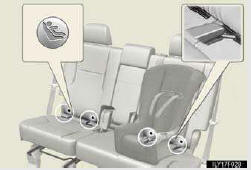
Seat belts equipped with a child restraint locking mechanism (ALR/ELR belts except driver’s seat belt)
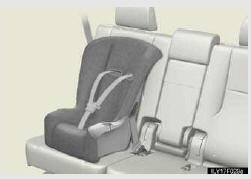
Anchor bracket (for top tether strap)
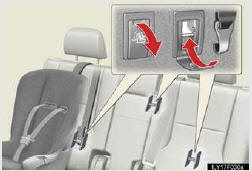
Anchor brackets are provided for each second seats.
- Installation with LATCH system
- Installing child restraints using a seat belt (child restraint lock function belt)
- Removing a child restraint installed with a seat belt
- Child restraint systems with a top tether strap
See also:
Switching the display
Press the “TEXT� button.
Each time the button is pressed, the display changes in the following order:
Elapsed time → Folder name → File name → Album title (MP3 only) → Tr ...
Setting a cellular phone
Registering a cellular phone in the hands-free phone system allows the system
to function. The following functions can be used for registered cellular phones:
- Functions and operation proced ...
Clock settings
Used for changing time zones and the on/off settings of daylight saving time.
1. Push the “SETUP� button.
2. Touch “Clock�.
3. Touch the items to be set.
4. Touch “Save�.
SCREEN ...