
Range covered by each camera
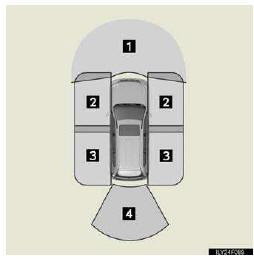
1. Front monitor
2. Side-front simultaneous display monitor
3. Side-rear simultaneous display monitor
4. Rear monitor
The illustration shown here is an example. As such, the actual visible area may be different. See P. 313 for information about the visual range of each camera.
See also:
Loading a CD
Press the “LOAD� button.
“WAIT� is shown on the display.
When the indicator on the slot turns
from amber to green, insert a CD.
The display changes from “WAIT� to “LOAD�.
...
Deactivating the curtain shield airbags in a vehicle rollover
ON/OFF (Hold for a few seconds)
The “RSCA OFF� indicator light turns on. (only when the “ENGINE START STOP� switch
is in IGNI- TION ON mode).
The roll sensing function for the curtain shie ...
Shuffle playback
- Playing songs from one playlist or album in random order
Press the 1 (RAND) button.
To cancel, press the 1 (RAND) button again.
- Playing songs from all the playlists or albums in ran ...